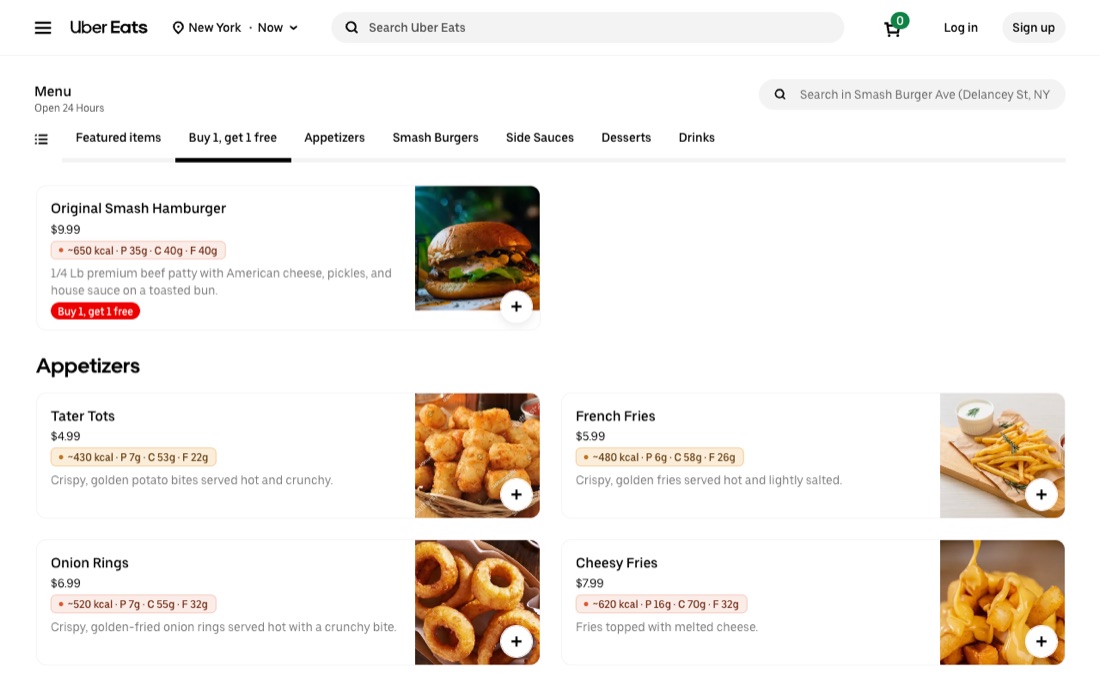
Uber Eats hides nutrition info — here’s how to see estimated calories and macros on every dish.
By default, Uber Eats does not display calories or macros for the dishes you browse. Restaurants rarely add nutrition data, so you’re ordering blind. The quickest fix is a free browser extension that estimates the numbers for you and shows them right on the page.
Uber Eats relies on each restaurant to provide menu details, and most don’t include nutrition. There’s no built-in calorie counter in the app or website, so a third-party tool is currently the only way to estimate calories as you browse.
The values are AI estimates based on each dish’s name and description. They’re designed to help you compare options (is this bowl lighter than that burger?), not to replace a lab nutrition label. Treat them as a useful guide.
Uber Eats does not show calories by default. Calorie Tracker is a free Chrome extension that adds estimated calories and macros directly onto each dish while you browse Uber Eats in your desktop browser.
Install the Calorie Tracker Chrome extension, open ubereats.com, and browse any restaurant. Estimated calories and macros appear automatically on each dish card — no copy-pasting or manual logging.
The values are AI estimates generated from each dish’s name and description. They are meant as guidance to compare lighter vs. heavier options, not as exact or medical nutrition figures.
The extension is free to install and comes with a 7-day free trial — full access on every dish, no credit card required. After the trial, the first few dishes of each menu still show their calories, and a low-cost Premium subscription unlocks unlimited use and full macros on every dish.
It works on ubereats.com in a desktop Chrome browser (where you can install extensions). It does not run inside the Uber Eats phone app.
Estimates generated by AI — guidance only, not medical or exact nutritional advice. Not affiliated with Uber Eats.